A booking link does one job: it takes somebody who has just decided they want an appointment and lets them have one.
That decision has a short life. It is made while looking at a photograph, and it lasts about as long as the scroll.
Everything below is about shortening the distance between that moment and a booking in your calendar.
It is an afternoon of work, and most salons do a quarter of it and then never look again.
The eleven places it belongs
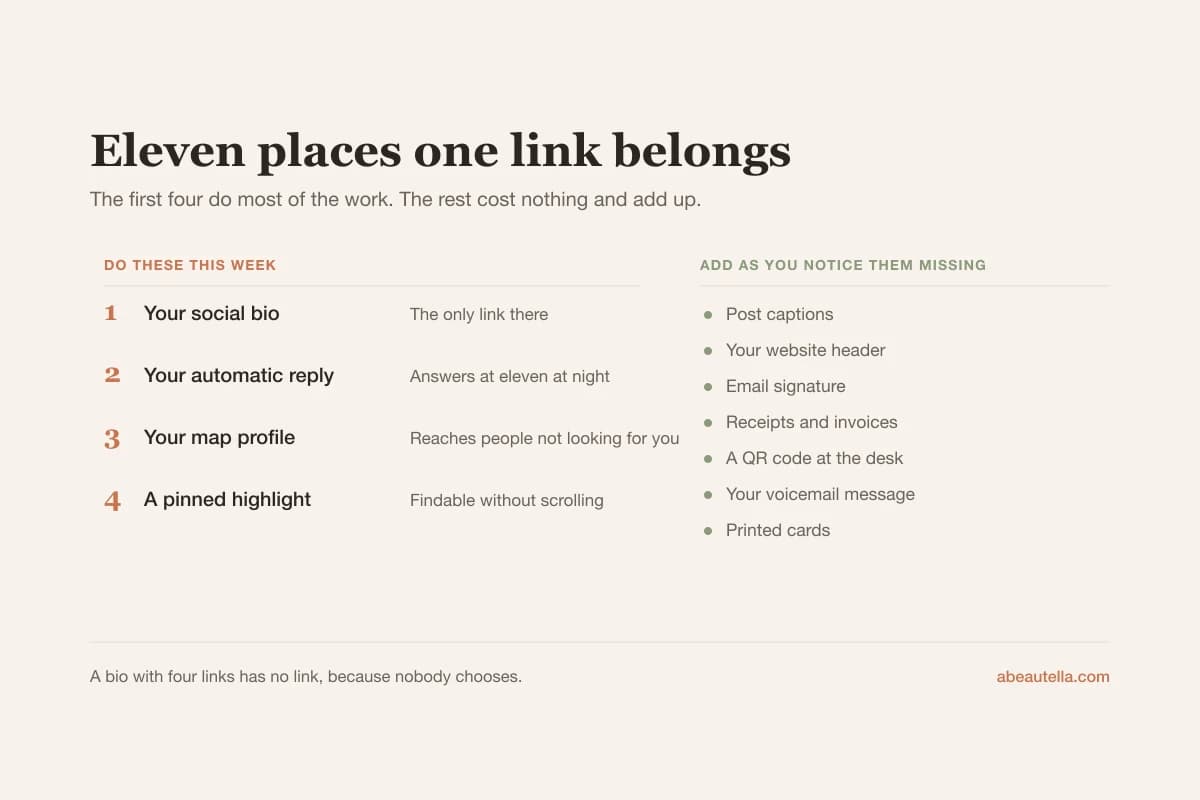
The first four do most of the work. The rest cost nothing and quietly add up.
The four that matter most
- Your social bio, as the only link there. A bio with four links has no link, because nobody chooses.
- Your automatic reply to messages, which is what turns a late-evening enquiry into a booking while you sleep.
- Your business profile on the map, where a booking button reaches people searching for a salon rather than for you.
- A pinned story highlight called something plain like Book, so it is findable without scrolling a grid.
The seven that cost nothing
- Post captions, on anything showing work somebody will want to copy.
- Your website, in the header, as a button rather than a menu item.
- Your email signature, which catches suppliers, referrals and anyone who has ever emailed you.
- Receipts and invoices, at the moment somebody is happiest with the result.
- A QR code at the desk, for the client who says she will book later and means it.
- Your voicemail message, spoken slowly, for the calls you cannot take.
- Printed cards, with the QR rather than a typed address nobody will transcribe.
Nobody does all eleven at once. Do the first four this week and add the others as you notice them missing.
What the page behind it has to do
A link is only as good as what it opens. Seven things decide whether a visitor becomes a booking.
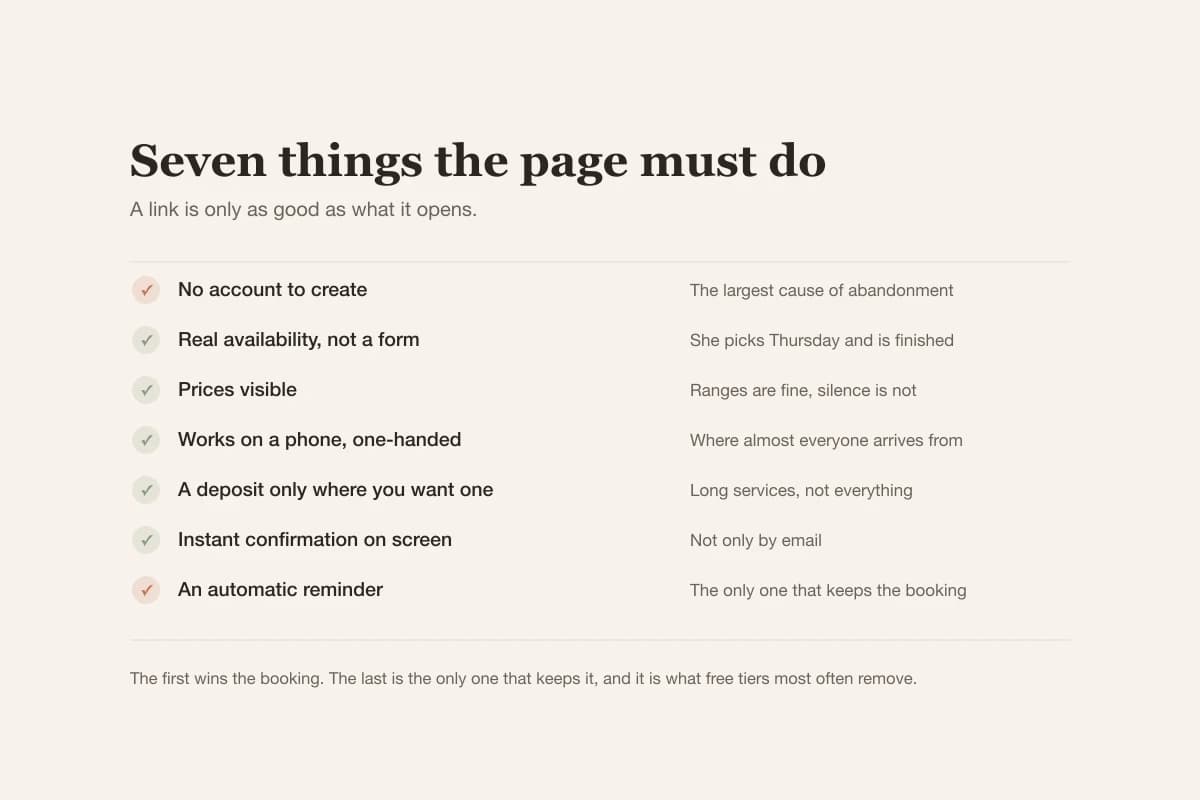
It must not ask for an account
This is the single largest cause of abandoned bookings and it is entirely avoidable.
A person who wanted an appointment thirty seconds ago is now being asked to invent a password. Many simply leave.
A name, a phone number and a tap should be the whole of it.
If the system offers accounts as optional, make sure the optional path is the obvious one rather than the small text underneath.
It must show real availability
Not a request form. A form that says we will get back to you has recreated the problem you were solving.
She should see Thursday at six, choose it, and be finished.
Anything less puts you back in the position of having to reply before an appointment can exist, which is the whole problem.
It must show prices
Hiding prices does not raise them, it filters out the people who would have paid them and were not willing to ask.
Ranges are fine where the work varies. Silence is not.
Nail art and colour correction are the usual reasons for hedging, and a range with a note explains both in one line.
It must work on a phone first
Almost everyone arriving from a bio is on a phone, at night, one-handed.
Test it that way rather than on the computer where you built it.
Small tap targets and a calendar that needs pinching to read are the two failures that survive desktop testing untouched.
It must take a deposit where you want one
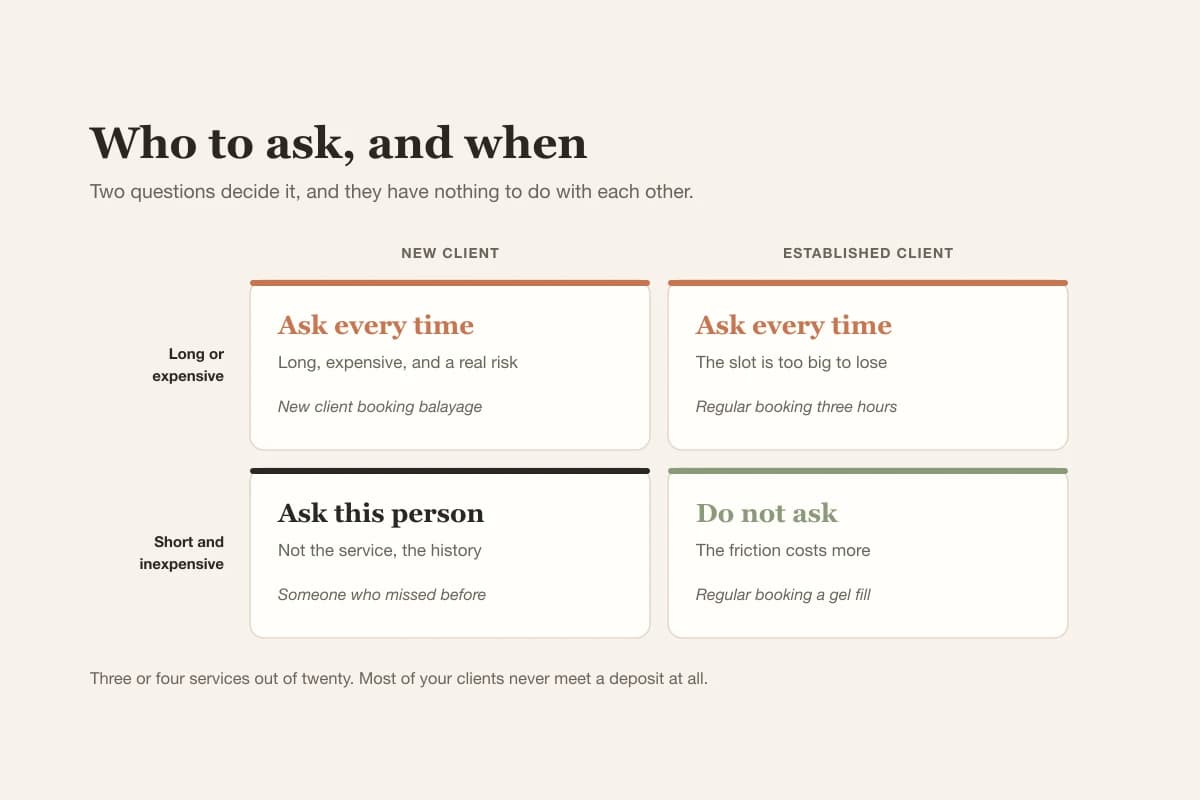
On long services only, not on everything, for the reasons set out in how to ask for a deposit.
It must confirm immediately
A booking with no instant confirmation feels unfinished, and an unfinished booking gets checked, doubted, or repeated.
Instant means on the screen, not only by email. Some people book with an address they rarely open.
It must send a reminder
Automatically, without you. This is the part that protects the appointment after it exists.
Everything before this point wins the booking. This is the only one that keeps it, and it is the one free tiers most often remove.
What to call it
A small thing that measurably changes how many people tap it.
Say what happens next, in the words a client would use, and keep it short enough to read while scrolling.
| Instead of | Use | Why |
|---|---|---|
| Book now | Book an appointment | Now adds pressure and no information |
| Link in bio | See available times | Describes what she will find |
| Online booking system | Book online, any time | The word system belongs to you, not her |
| Contact | Book or ask a question | Contact hides that booking is possible |
Availability is the most persuasive word available to a salon, because the fear behind hesitation is usually that nothing is free.
Testing it properly
Nearly every broken booking link is broken in a way its owner cannot see, because owners are logged in and use a computer.
- Open it on your own phone, in a private window, so you arrive as a stranger with no session.
- Book a real appointment at a real time and count the taps. More than six is worth fixing.
- Check what arrives: the confirmation, its wording, and whether it says where you are.
- Cancel it and read what the client receives. This message is written once and read hundreds of times.
- Ask two clients to try it and watch without helping. You will learn more in four minutes than in an hour of guessing.
Step five is the one people skip and the one that finds the real problems.
Watching someone hesitate over a button is worth more than any amount of thinking about the button.
What the confirmation and reminder should say
These two messages are written once and then read by every client you ever have, which makes them worth twenty minutes.
Most systems ship with a default that is technically correct and reads like a receipt from a parking machine.
The confirmation
It has one job beyond confirming: removing every reason to message you afterwards to check something.
So it needs the service, the date and time, the price, the address, and what happens if she needs to change it.
The address is the one most often left out, and it is the one people message about most.
If parking is difficult, or the entrance is round the back, say that here rather than waiting to be asked.
The reminder
Twenty-four hours ahead is the usual timing and it is a reasonable default for almost every salon.
It should be shorter than the confirmation and it should make changing the appointment easy rather than awkward.
A reminder that invites a cancellation gets some cancellations, and every one of them is a slot you can still fill.
A reminder that makes cancelling feel difficult gets silence, and then an empty chair with no notice at all.
That trade is nearly always worth taking, and the evidence behind it is in nine methods that reduce no-shows.
When you genuinely have more than one link
The advice to keep one link in your bio runs into a real objection: some salons have several things worth linking to.
A price list, a location, a shop, a form for hiring. All legitimate, and all competing for the same single line.
There are two honest ways to handle it and one common way that does not work.
The one that does not work is a page of eight equal links. Everything becomes equally important, which means nothing is.
The first that works is a landing page with one large booking button and the rest as small text underneath.
The hierarchy does the job. Somebody wanting to book finds it instantly; somebody wanting the address still finds that too.
The second that works is better still: put everything the visitor needs on the booking page itself.
Prices belong there anyway, and so does the address. Once they are there, the extra links stop being necessary.
That is the version to aim for, because every intermediate page between deciding and booking loses some people.
Knowing whether it worked
Two numbers, both easy, and neither needs any analytics setup.
How many bookings arrived outside working hours. This is the clearest evidence the link is doing something a message could not.
How many message requests you got. If it drops while bookings hold steady, the link absorbed the administrative traffic.
Count both for the month before and the month after. That comparison is worth having written down.
If neither number moves, the problem is usually placement rather than the page. The link is somewhere people are not looking.
The diagnosis behind all of this, and why evening enquiries go cold, is in booking by Instagram DM.
The mistakes worth avoiding
Four recur often enough to be worth naming, and all four are easy to undo.
Several links in the bio. A booking link competing with a price list and a map is a booking link nobody taps.
A link to a marketplace listing. That is somebody else's page with your competitors on it, which is a different decision entirely.
A link that has quietly broken. Check it once a month. A dead link looks identical to a salon that closed.
Availability that is not real. If the page offers times you cannot honour, the first correction undoes the trust the link was building.
The third one is the most common and the most costly. Nobody tells you your link is broken, they just book elsewhere.
The afternoon, in order
- Get the link from whatever system holds your calendar, and check it opens for a stranger on a phone.
- Make it the only link in your bio, worded as available times rather than book now.
- Put it in your automatic reply, so evening enquiries stop going cold overnight.
- Add it to your map profile, which reaches people who were not looking for you specifically.
- Create a highlight called Book, so it survives being scrolled past.
- Book yourself, then cancel yourself, and read every message that arrives.
Six steps, one afternoon, and then a reminder in the calendar to check the link is alive once a month.
That last habit costs thirty seconds and prevents the most expensive of the four mistakes above.
None of this needs redoing. A booking link set up properly keeps working for years without further attention.