Square Appointments has a base tier with no monthly fee, and it is not a trial. One person, a real calendar, online booking and reminders, for nothing.
That is unusual enough to be worth taking seriously. Most free plans in this category are either a trial or a demonstration.
Square earns from processing your card payments instead, which is a real cost and a very different one from a subscription.
It is also a payments company that added booking, rather than a beauty product. That shows in specific places, and this guide names them.
What the free tier actually includes
More than most people expect, which is why it deserves a straight answer rather than a dismissal.
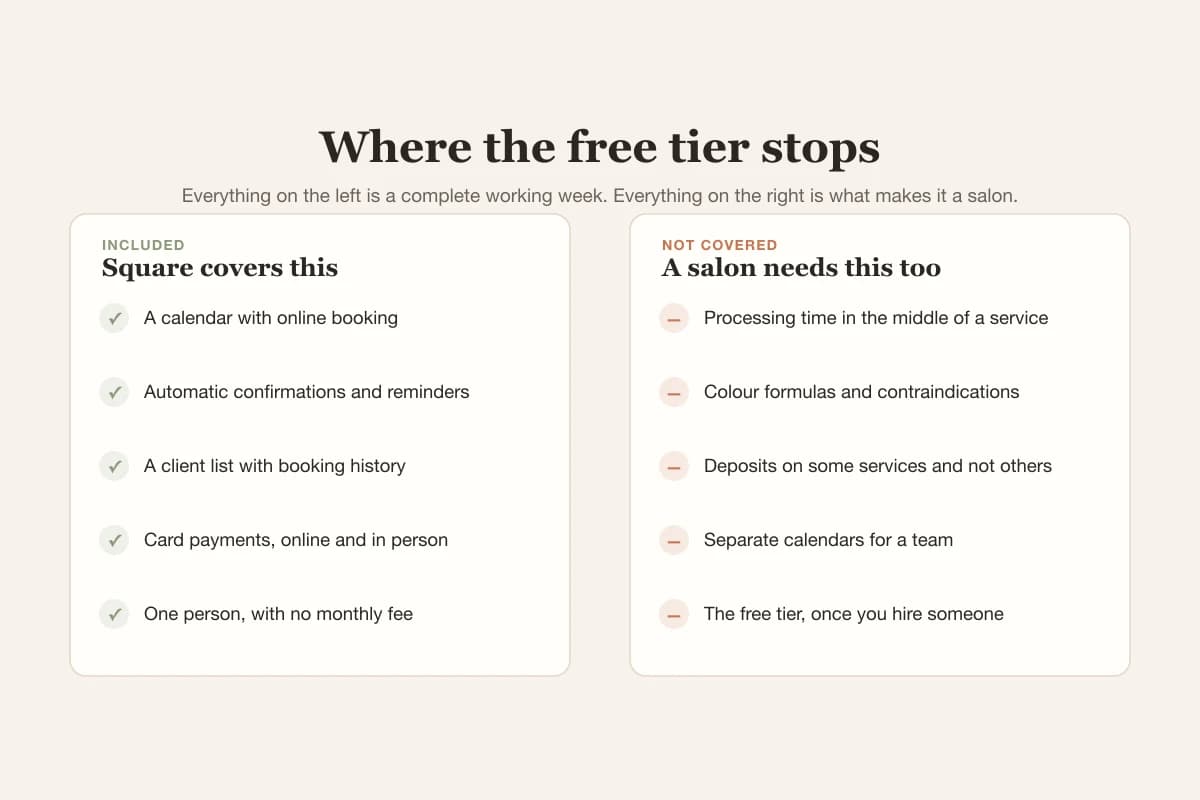
- A calendar with online booking, on a page clients can reach from a link.
- Automatic confirmations and reminders, which is the single most valuable thing any of these platforms do.
- A client list with basic contact details and booking history.
- Card payments, taken online or in person, with no monthly fee attached.
- One person. Adding staff moves you to a paid tier.
For a solo specialist with simple services, that list covers the working week. Nothing above is a cut-down version of a real feature.
What it costs, since it is not free
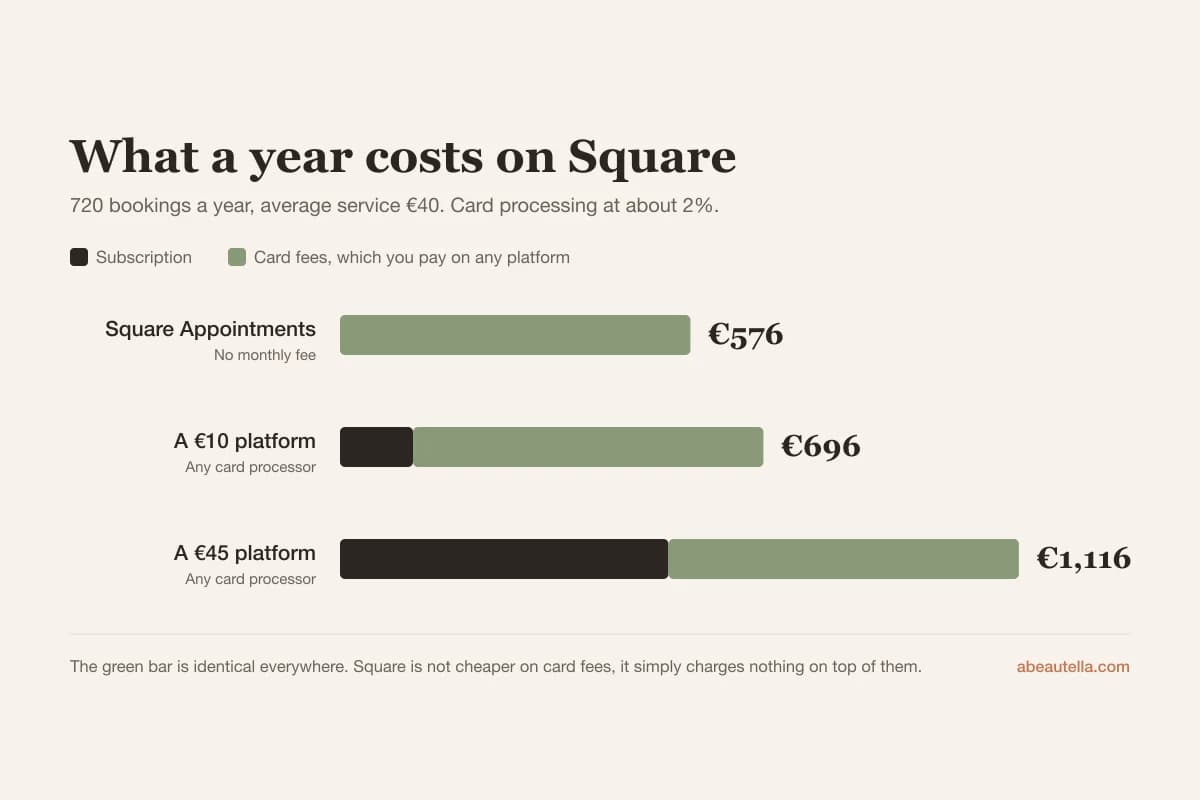
The subscription is zero and the processing is not. Around two per cent of every card payment, on every booking, all year.
| Subscription a year | Card fees at €28,800 turnover | Total | |
|---|---|---|---|
| Square Appointments | €0 | About €576 | €576 |
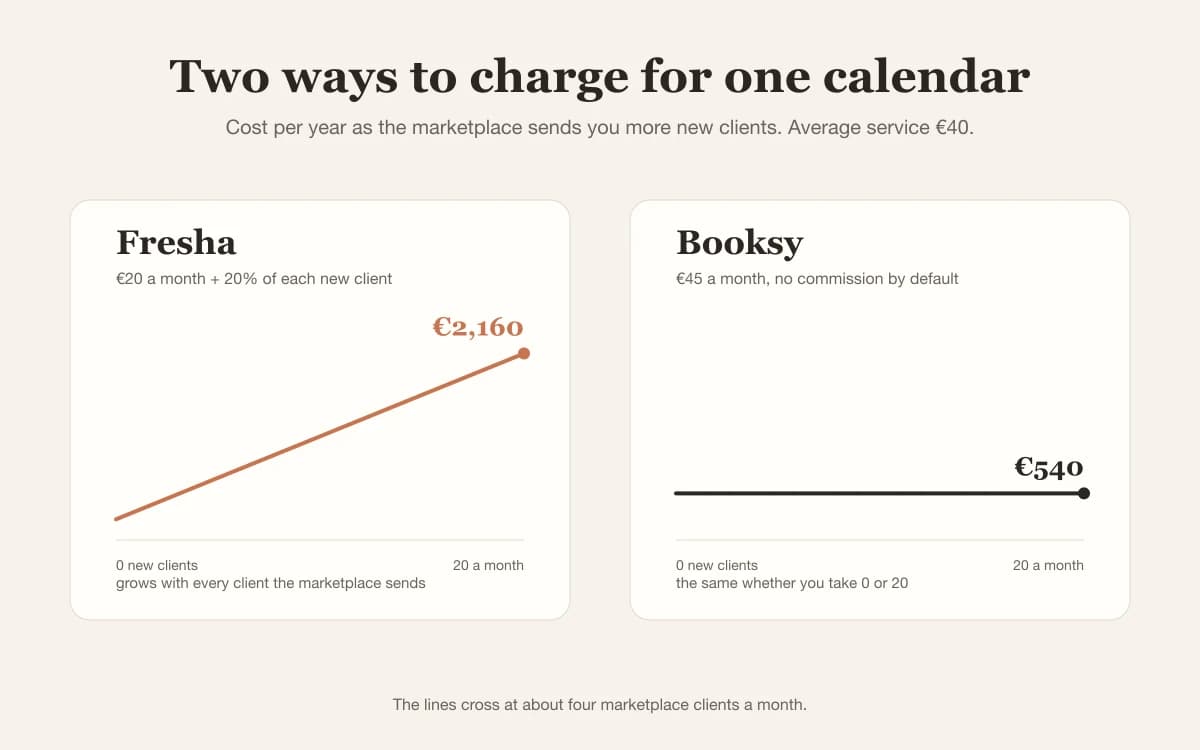
| A €10 platform | €120 | About €576 with any processor | €696 |
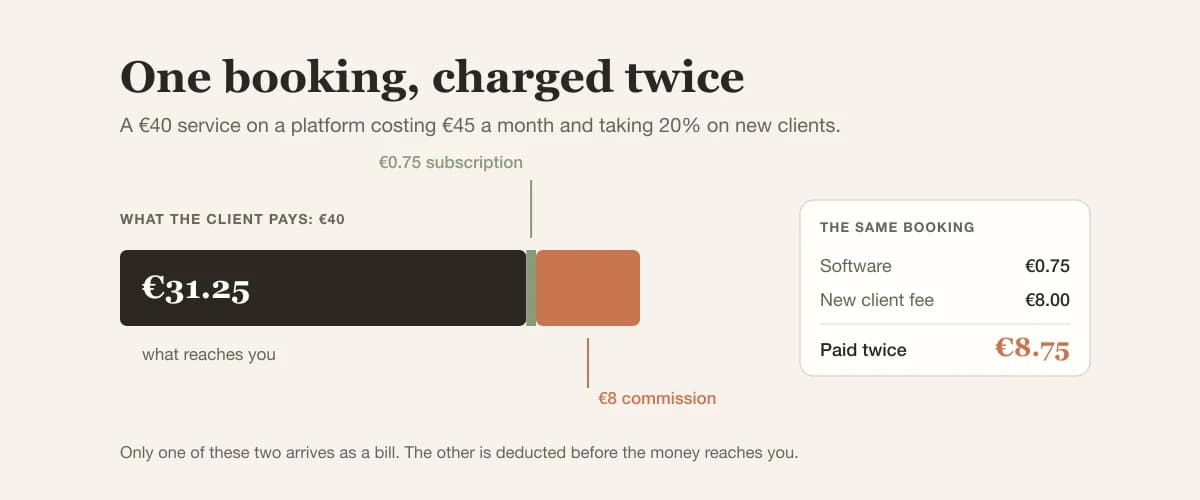
| A €45 platform | €540 | About €576 with any processor | €1,116 |
Read that table carefully, because it is the one people get wrong. The card fee is not unique to Square.
Whichever platform you use, someone processes the payment and takes a percentage. Square just does not charge a subscription on top.
Where it stops being enough
Everything below exists because a salon is not a generic appointment business. None of it is a criticism of Square as software.
Service durations that mean something
A colour is three hours, a root touch-up is ninety minutes, a fringe trim is fifteen. A calendar that treats them as the same slot will overbook you.
Square handles different durations, but not the beauty-specific version: processing time in the middle of a service, where the chair is free while the colour develops.
For a colour salon this is not a nicety. It is the difference between four clients in a day and six.
What the client record has to remember
A colour formula from the last visit. A contraindication noted before a facial. Which product made someone react.
A generic notes field can hold these. It cannot structure them, search them, or put them in front of you at the moment you need them.
For a cosmetics studio the second of those examples is not administrative. It is the reason the consultation exists.
Deposits on some services and not others
A deposit on everything loses you bookings. The useful version applies to long services only, or to clients who have missed before.
Selective deposits are hard to express in a generic tool, and they are the single most effective thing against no-shows, as we cover in nine methods that work.
A team with separate calendars
One booking link for the salon, one calendar for each person, and clients choosing who they want. A barbershop needs all three at once.
This works on Square's paid tiers. It is worth knowing that the free tier ends the moment you hire someone.
What Square does better than the beauty tools
An honest comparison owes this section, and there is a real answer.
Payments are its actual business. Refunds, tips, split payments, terminals and reporting are more mature than in most salon software.
If you sell products alongside services, the stock and till side is a genuine product rather than a bolted-on feature.
And if you already use Square for payments, adding the calendar costs you nothing and gives you one system instead of two.
Reporting is the other place it pulls ahead. You can see what you actually earned, by service and by week, without exporting anything.
Most salon software treats reporting as a screen it had to include. Here it is the part the company has been building longest.
Who it fits
The honest answer splits almost exactly along one line: whether you work alone with simple services, or you do not.
Nothing in the table below is a flaw in Square. Each row is a place where a general tool meets a specific trade.
| Your situation | Square is | Because |
|---|---|---|
| One person, simple services | A very good answer | The free tier covers the whole job |
| Already on Square for payments | The obvious answer | One system, no extra cost |
| Selling products as well as services | Strong | Till and stock are a real product here |
| Colour work with processing time | Limiting | The calendar cannot use the free gap |
| A team of three or more | Fine, but no longer free | Staff calendars are a paid tier |
| Treatments needing structured records | Not enough | Notes are a field, not a record |
How to test it in a week
- Enter your five most common services with their real durations, including any gap in the middle. If you cannot express the gap, note that.
- Book yourself from a phone, start to confirmation, and count the taps.
- Cancel it and read what the client receives.
- Try to set a deposit on one service only. This is where generic tools usually stop.
- Add a fake second staff member and see what changes about the price.
Step four is the fastest way to find out whether Square fits your salon. Ten minutes, and you will know.
Do all five before you migrate a single real client. Every one of them is cheap now and expensive in six months.
What the client sees when they book
The half of the product you never look at is the half that decides whether a booking finishes. It deserves five minutes of attention.
Square's booking page is fast, clean, and free of clutter. Nothing on it competes with you for the visitor's attention.
That is a real advantage over any marketplace, where your page sits beside four other salons and a sponsored listing.
It also looks like Square. The page carries their visual language more than yours, and there is a limit to how far you can move it.
For a solo specialist that costs nothing at all. Clients care that booking works, not whose design system it uses.
For a salon that has spent years on how it looks and feels, it is a small compromise that never quite goes away.
Test it the way a client actually behaves: on a phone, at nine in the evening, without creating an account first.
If that path is short and obvious, the booking page is doing its job. Most of the ones that lose you clients fail at the account step.
What happens when you hire someone
This is the single most important thing to establish before you build your week around the free tier.
The free tier covers one person. The moment a second calendar exists, you are on a paid plan, and the comparison starts again from zero.
That is not a trick. It is simply where Square draws the line, and it is a reasonable place to draw it.
What it means in practice is that a salon of four is no longer comparing Square against paid software. It is comparing paid against paid.
| Your team | What you need | What it changes |
|---|---|---|
| One person | The free tier | Nothing. This is the whole offer |
| Two people | A paid plan | Separate calendars, and a monthly fee |
| Three to five | A paid plan per location | Permissions, roles, and a bigger fee |
| Two locations | A plan for each | The price roughly doubles |
Price it for the team you expect to have in a year, not the one you have this month.
Choosing a platform is a decision you make once and live with for years, and hiring is the event that most often breaks it.
Getting your data back out
Square holds two things that matter to you: your client list and your entire payment history.
Both export as spreadsheets, which is more than several platforms in this category offer without a support ticket.
That is worth crediting. A payments company is used to being audited, and it shows in how the records come out.
What does not survive the export is anything you kept in free-text notes, because a notes field has no structure to preserve.
Colour formulas, allergies, and product reactions arrive as prose. The information is not lost, but it is no longer a record.
If there is any chance you will move platforms later, keep those three things somewhere structured from the first day.
It costs nothing to do at the start and it is close to impossible to reconstruct afterwards.
Square against the others
Against a marketplace platform the comparison is simple: Square never charges per client, because it does not introduce you to anyone.
Against a beauty-specific subscription the question is whether the missing pieces cost you more than the monthly fee saves.
One overbooked afternoon a month, or one client who reacted to a product nobody recorded, is worth more than €10 a month.
That is the honest frame, and it is the same reason we built what we built. Our free tier exists for the same person Square's does.
Verdict
Square Appointments is the best genuinely free calendar in this category, and for a solo specialist with simple services it may be all you ever need.
It stops where beauty starts: processing time, structured client records, and deposits that apply to some services and not others.
If none of those three matter to your week, stop reading comparison articles and use it. It is free, it works, and the decision is made.
If two of them do, the monthly fee elsewhere stops being the expensive option, because the thing you are buying is not features.
It is the hour you do not lose to an overbooked afternoon, and the client who does not react to something nobody wrote down.